01 Your Markdown file
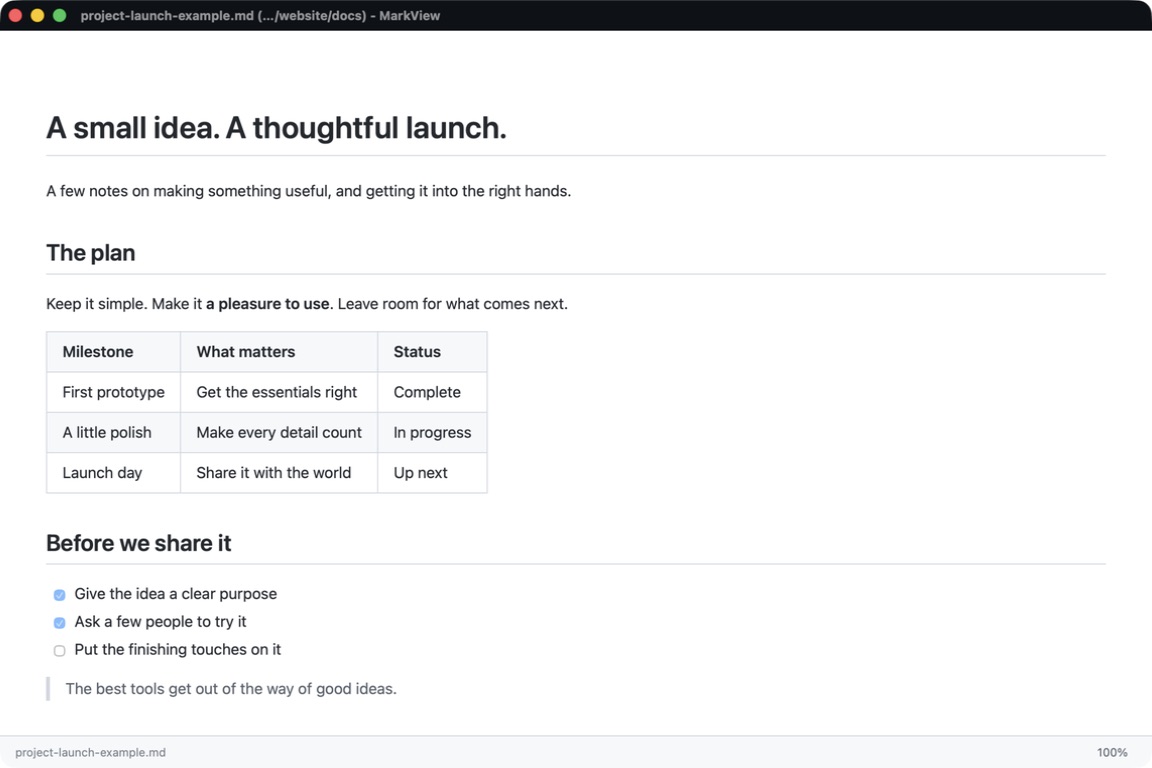
# A small idea. A thoughtful launch.

## The plan

Keep it simple. Make it **a pleasure to use**. Leave room for what comes next.

## Before we share it

- [x] Give the idea a clear purpose
- [x] Ask a few people to try it
- [ ] Put the finishing touches on it02 Open it in MarkView
Simple. Beautiful. Free.
Everything you need to read Markdown files, nothing you don't.
Clean Typography
GitHub-style rendering with beautiful, readable fonts. Tables, code blocks, and lists look exactly as intended.
Dark & Light Themes
Automatic system theme detection, or choose your preferred mode. Easy on the eyes, day or night.
Drag & Drop
Just drop a .md file onto the window. Or use File, Open. Or double-click any Markdown file.
Zoom Controls
Adjust text size with keyboard shortcuts (Cmd/Ctrl +/-) for comfortable reading at any distance.
Lightning Fast
Native desktop performance. Starts instantly, uses minimal memory, never slows you down.
Privacy First
Your files never leave your computer. No uploads, no cloud, no accounts required.
Download MarkView
Free for macOS, Windows, and Linux. No account required.
All downloads are served securely from CloudFlare's global network.
Why MarkView?
Markdown is everywhere now. But sharing it with normal people? That's still a mess.
If you use AI coding tools like Cursor or Claude Code, your specs and documentation end up as .md files. Even regular ChatGPT users run into this—click that copy button and paste into a text file, and you've got Markdown whether you meant to or not. The format is everywhere now.
The problem comes when you need to share these documents. Send someone a .md file today, and they'll open it in Notepad. Headings look strange. Formatting codes are confusing. And tables? Completely unreadable—a grid of pipes and dashes that makes no sense to anyone.
There are tools that render Markdown beautifully, but none fit the everyday use case:
- Typora is excellent—but it's paid software. You can't expect friends or colleagues to buy an app just to read a document.
- VS Code, Obsidian, Notion—these are power tools for power users. Way too heavy for "just open this file."
- Online viewers require uploading your files to some website. Privacy nightmare.
There was no simple, free Markdown reader that anyone could install and use in seconds.
MarkView fills that gap.
It's a viewer, not an editor. Minimal, not bloated. Free, not paywalled. Built for normal humans, not developers. Designed to make AI-generated documents actually shareable.
About this MarkView
MarkView at markview.io is a free, native desktop app for opening and reading Markdown (.md) files on macOS, Windows, and Linux. It is built and maintained by Doug Kerwin and installs as a standalone application.
It is distinct from browser extensions, editor plugins, enterprise document-management tools, and other products that also use the MarkView name. Official downloads for this MarkView are always published on markview.io.
MarkView for Mac MarkView for Windows Release notes Product Hunt AlternativeTo
About the Author
Doug Kerwin is a serial builder who's spent hundreds of hours working with AI coding tools to build real production systems.
He is the author of The Enterprise Vibe Coding Playbook: How Real Teams Build Real Software With AI and Riley & Bot, a children's book about AI and the future of work.
Doug believes Markdown is becoming the document format of the future—driven by AI tools that generate it by default—and that everyone deserves a simple way to read it.
MarkView is built and maintained by Doug Kerwin personally. New versions ship regularly, and user feedback goes directly to him. If you find a bug or want to see a feature, just drop a note.
Support MarkView
MarkView is free and independently developed. If you find it useful, consider buying me a coffee to help cover hosting and development costs.
Frequently Asked Questions
What is a Markdown (.md) file?
Markdown is a lightweight text format used for documentation, README files, AI chat exports, and notes. The file extension is .md. Tools like ChatGPT, Claude, Cursor, and Claude Code save documents as Markdown by default. Opened in Notepad it looks like text with stray symbols; opened in a Markdown viewer it renders into a clean, readable document.
How do I open a .md file on Mac?
Download MarkView for macOS (Apple Silicon or Intel), install the .dmg, then double-click any .md file. You can also drag a .md file onto the MarkView window. To make MarkView the default app for .md files, right-click any .md file in Finder, choose Get Info, expand Open With, select MarkView, and click Change All.
How do I open a .md file on Windows?
Download MarkView for Windows. Both an .exe installer and an .msi package (for IT deployment) are available. After install, double-click any .md file or drag it onto the MarkView window. To make MarkView the default Markdown viewer, right-click any .md file, choose Open With, then Choose another app, select MarkView, and check Always use this app.
What is the best free Markdown viewer?
For viewing .md files rather than editing them, purpose-built viewers like MarkView are the lightest option — free, instant to open, no account required, and available for Mac, Windows, and Linux. Editors like Typora render Markdown beautifully but are paid. General-purpose tools like VS Code, Obsidian, and Notion can also display Markdown but are designed for power users and are overkill for someone who just needs to read a .md file shared with them.
Why do .md files look weird in Notepad?
Markdown files are plain text with formatting symbols like # for headings, * for emphasis, and pipe characters for tables. Notepad and other plain-text editors show those symbols literally, so headings, bold text, and tables appear cluttered and hard to read. A Markdown viewer like MarkView interprets those symbols and renders the document the way the author intended — with proper headings, formatted text, and readable tables.
How do I make .md files open in MarkView by default?
MarkView includes a built-in Set as Default option in its menu that handles this in one click on both Mac and Windows. You can also do it manually: on Windows, right-click any .md file, choose Open With, then Choose another app, select MarkView, and check Always use this app. On Mac, right-click any .md file in Finder, choose Get Info, expand Open With, select MarkView, and click Change All. After that, double-clicking any .md file will open it in MarkView automatically.
Which MarkView is markview.io?
MarkView at markview.io is a free native desktop application for opening and reading Markdown files on macOS, Windows, and Linux. It is created and maintained by Doug Kerwin and is distinct from browser extensions, editor plugins, enterprise document-management tools, and other products that also use the MarkView name.
Does MarkView work offline?
Yes. Once installed, MarkView runs entirely on your computer. Opening and rendering Markdown files does not require an internet connection, and your files are never uploaded anywhere. There are no accounts, no cloud sync, and no telemetry on file content — the only network activity is an occasional check for new versions of MarkView itself, which you can disable.